

Return to Q&A Database
How to install question
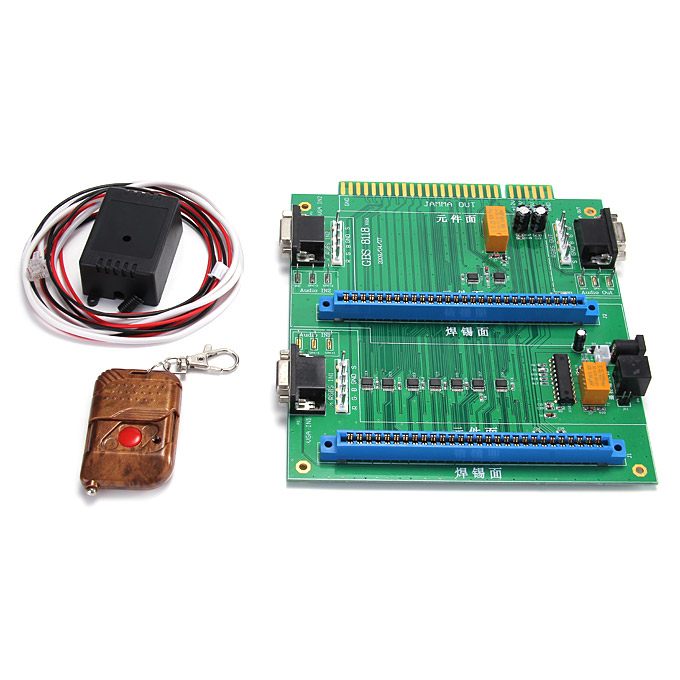
Question from Evan: Hello. I really love your website. You guys are amazing with all the info on your videos. I have a very simple question. To ask, I am a beginner at this. I recently purchased a table top multi arcade that has 1 board in it and I wanted to put a switcher in to play two boards. I found a 2-in-1 switcher online and it comes with a remote (with no instructions) so I was wondering if you guys know any how to install videos or if you made one yourself. I appreciate your time. Thanks, Evan
1 answer

Response from Jonathan: Evan,
We are not real familiar with these 2-in-1 JAMMA switching boards but the installation should be pretty easy. There are some instructions on the Holland Computers page for this item which might help you out. Basically, you should be able to plug your existing JAMMA harness into the edge connector on this switcher board (assuming that your table top multi arcade is a JAMMA wired cabinet) and then plug the JAMMA game boards you want to use in the slots on this board. Mounting the boards in your cabinet might be a little tricky but you can purchase a couple of JAMMA harness extenders that will add some wiring between your JAMMA game boards and the slots on the 2-in-1 JAMMA switcher board.
Unfortunately we don’t know of any videos documenting the installation process but we’ll definitely add it to our list. Hopefully we can get around to recording one very soon. Of course, please let us know if you have any specific questions about the process and we’ll try to help you out further.
Hope that helps. Thank you for your question and good luck with your project.
This question has been closed
