

Return to Q&A Database
Coin door wiring?
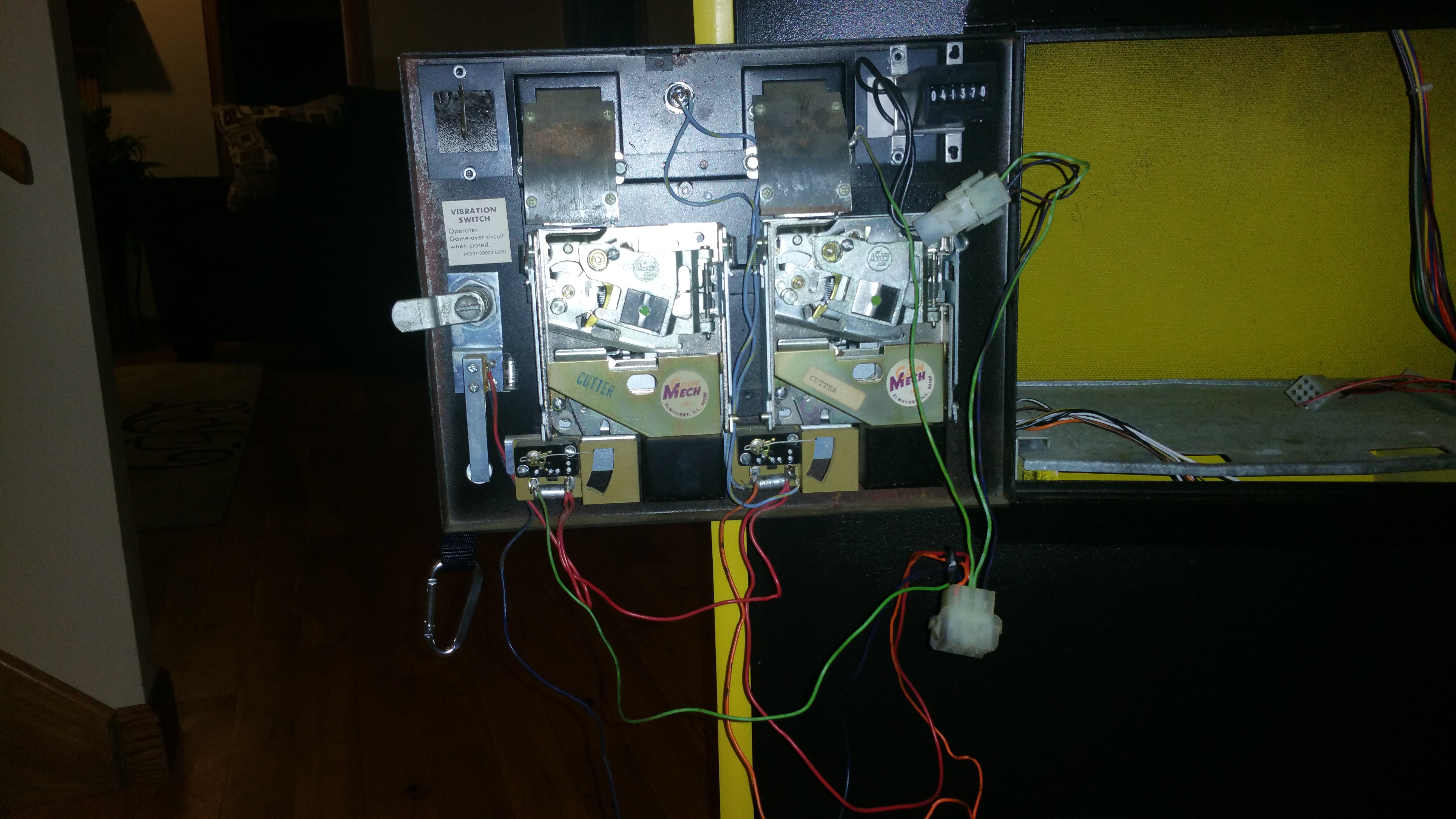
Question from Kevin: Hey Jonathan, I’m currently working on my first 60-in-1 and I have everything working as it should. Everything except being able to coin up and actually play a game. I haven’t been able to figure out this coin door wiring to be able to actually coin up. For some reason when I go into the test menu with the dip switch on the board it will not save my setting to be on free play. I have an original Pac Man game and wired up the coin switch inside the coin door as the test switch and it shows it’s working in the test menu but it will not bring up the test menu while at the main menu? I’m attaching a photo of the coin door with the wires hanging, hopefully you could direct me as to which wires are what so I can hook them up to my JAMMA harness and call this build complete!!! Thanks man!!
1 answer

Response from Jonathan: Kevin,
First off, we have also had 60-in-1 boards that wouldn’t save the settings in the test menu. We would suggest contacting the entity that you bought your board from to see if you can get it exchanged. We typically buy our 60-in-1 boards from Michael at Cajun Arcade or Nick at JAMMA Parts. Both of them have great customer service. We have had to return boards to them in the past and they have always taken the old board back and shipped a new board no questions asked. Highly recommend this as there could be other settings you want to change with your 60-in-1 board at a later date. Just one more note, make sure you are pressing the Player 1 Start button after you change it to free play or the settings will not save.
As for your question, the coin switch wires are connected just like you would wire up a push button. From your picture, it looks like the green and orange wires are your coin wires while the red wire is acting as your common (or ground) wire. We recommend checking this against your original cabinet wiring just to double check our conclusion. In this case, you will need to run a ground wire along with the 2 coin wires (located at 16 and T respectively) from your JAMMA harness to these wires in order to connect them to your 60-in-1 board. The process should be pretty straight forward but please let us know if you have any specific questions and we’ll be glad to help you out. Also, here is a link to the JAMMA harness pinouts just in case you need them.
You also asked about getting to the test menu using the test switch. Unfortunately the test switch for the 60-in-1 board does not work on the main menu. You have to hold the switch down while the 60-in-1 is booting up in order to get to the test menu.
Hope that helps. Thank you for your question and good luck with your repair.
This question has been closed
