

Return to Q&A Database
monitor nanao ms29
Question from Bud: Hi. First, what fantastic tips and videos! Absolutely fabulous!!!!! I have watched and read every episode.
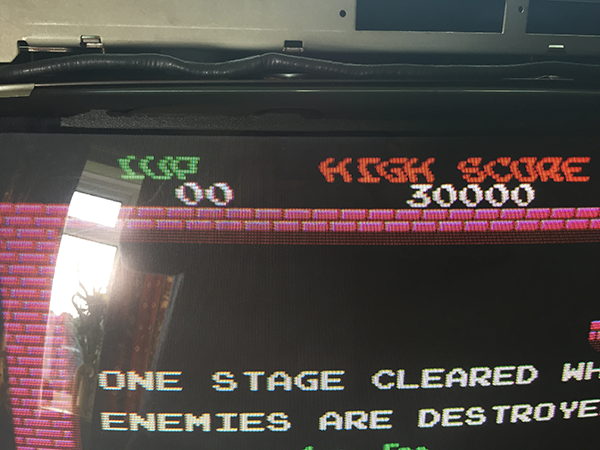
Can you help me? I am from the UK and find it difficult to come by answers. I have recapped a nanao ms29 as it had line problems, etc. I fixed these issues but when I plugged it all back in and fired it up I had a small distortion at the top (see pic). I tried the 15hz pot but it didn’t do much as suggested by a forum member over here.
Have you any suggestions? I have checked the caps and they all or correct polarity and seem well soldered.
Thank you for a great website.
Bud
1 answer

Response from Jonathan: Bud,
From your picture, it seems like you may be having a problem with the horizontal/vertical hold or the B+ voltage on your monitor chassis. Just FYI, it’s very common for issues like this to crop up after a cap kit. Remember that the old caps may have been letting through more or less voltage than they should have been which might have caused the previous owners of the cabinet to make adjustments to these pots. This is why we always recommend “dialing in” these pots whenever you install a cap kit on your monitor. As far as the cap installation goes, it seems like you are getting a solid picture which usually indicates that all of your caps were installed properly. You will usually find out after running the monitor for an hour or two if there is a cap that was incorrectly installed. So, try to adjust these pots on the monitor chassis and feel free to contact us again if the problem continues to occur.
Hope that helps. Thank you for your question and keep us updated on your progress.
This question has been closed
