

Return to Q&A Database
Convergence Question
Question from Jason: Hi, I have been viewing your YouTube videos on arcade machine repair. Very informative and well put together. I was hoping you could help answer a question or two about CRT repair. I have contacted some local TV repair shops but it seems most don’t even know how to work on them anymore, or at least don’t want to.
I have an Sony KV-32FV310 television that I picked up for old school gaming. It is in excellent shape and most of the time I would never notice anything is wrong with it, but under the right conditions I have found some issues.
I noticed when I would go into some gaming menus that the white text would have a hue of color next to it making the image look blurry. After some research I realized this is a convergence issue. I have the service manual and instructions on what to turn to try to bring the convergence into alignment. What I was hoping you could do is tell me if I am likely to kill myself. I don’t plan on touching anything with my hands directly if I don’t have to. Is there anything specifically I should avoid touching or tool I should use?
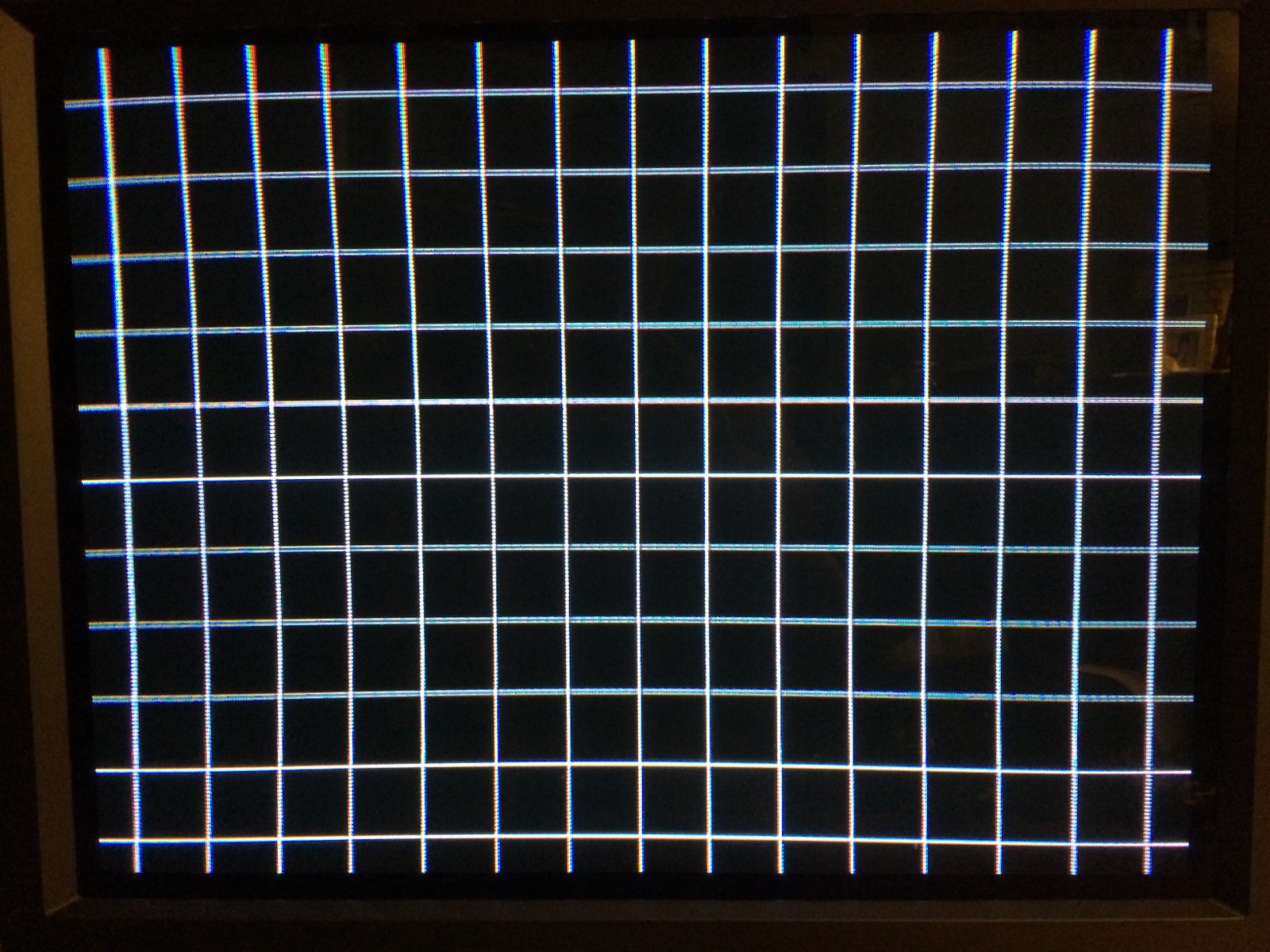
The convergence issue above is the main reason I am reaching out but there is also a bowing issue at the top of the screen. I am less concerned about this than the convergence issue but if I can fix it while the cover is off, great. It seems to be a common problem of Trinitrons based from comments on the internet. It can’t be fixed in the service menu. Some have blamed a sagging yoke and a piece of rubber underneath it.
Attached is an image of a test pattern on the screen. You can see the convergence issues in the upper half of the screen, most noticeably the top left and top right corner. And the bowing can be seen easiest toward the top left. I had read several locations that indicated a degaussing coil might fix the convergence issue but other things I’ve read seem to indicate that it would only fix a purity error such as a wrong color or color blob on the screen.
There are some minor geometry issues I’ve notices too such as side scrolling games looking wavy as the background moves across the screen but I assume that is either something that can’t be fixed because of the flat screen or is something that I will have to make a lot of small adjustments in the service menu to fix.
Thank you for any assistance you can provide.
Jason
1 answer

Response from Jonathan: Jason,
Yes, it does seem like a convergence issue. No, you’re not likely to kill yourself as long as you take precautions. We always suggest Safely Discharging A Monitor Tube first so that you can ensure that most of the voltage is removed from the tube. Even after you’ve discharged the tube a couple of times, it can still hold a charge so make sure you avoid getting close to the anode (the hole on the tube where the flyback plugs in).
The bowing issue is probably more conducive of a sagging yoke as you mentioned. You can try to shim it back up (we discuss this in our post on Monitor Convergence Tips) but it might be tough considering how long the yoke as been in that location. A degaussing coil is probably not going to fix this issue but it can’t hurt and is definitely worth a shot.
Not sure about the side scrolling games looking wavy. It could be a result of the other geometry issues you are experiencing. It’s always a good idea to try the adjustments first before suspecting the monitor itself.
Hope that helps. Thank you for your questions and good luck with your repair.
This question has been closed
