

Return to Q&A Database
Please help
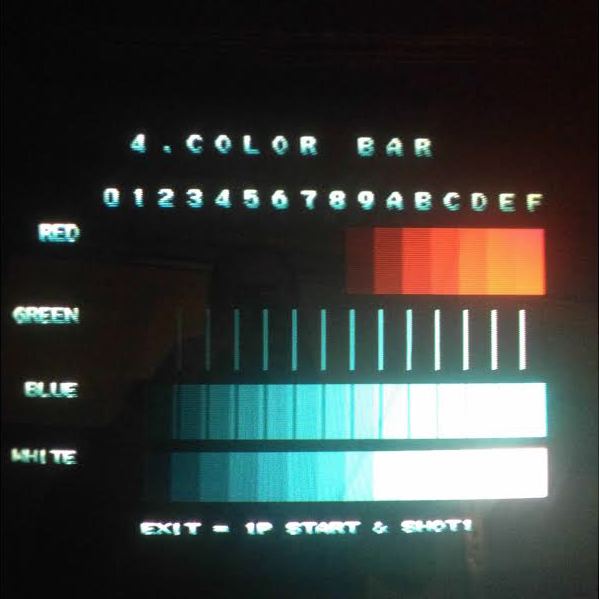
Question from Robert: Howdy, I recently came across a non-operating Marvel vs. Capcom: Clash of Superheroes game. I was able to fix a couple of things and got it working. The only issue now is that green is not displaying. I got into the service menu and I am not able to change the color settings. I have included a pic of the menu. Do you know how I can adjust the RGB on this game? Any help is appreciated. Thank you.
1 answer

Response from Jonathan: Robert,
While color issues like this are usually related to the monitor chassis, the screenshot you sent looks like this one is going to be a board issue. If you wanted to be sure that this is the case, you could try plugging another JAMMA board into your cabinet. If the problem really is your arcade board then you should get the green color on your screen when you connect a different JAMMA board with a working green video line.
With that said, most arcade boards do not allow you to change the colors from the board’s service or test menus. You will have to do some backtracking on your Marvel Vs Capcom board itself to see where the green line is broken. The easiest way to do this is to follow the traces from the green video pin on the JAMMA edge connector on the board and see if there’s anywhere it’s not making a connection. A lot of times this problem can be traced back to some bad RAM chips so you may need to replace them. I am not familiar enough with CPS-2 boards to know where the video RAM is on the board. You might try contacting our friend Raymond at ArcadeComponents.com and see if he knows off hand. He’s also much better than we are when it comes to board level repairs such as this. Of course, if you’re not comfortable doing this type of repair you could always just buy another Marvel Vs Capcom board and that should solve your issue.
Hope that helps. Thank you for your question and good luck with your repair.
This question has been closed
