

Adjusting An Arcade Monitor

When you start troubleshooting your arcade monitor, remember to always start off with the simple fixes before moving on to the more complex ones. Many of us want to install a cap kit before giving the adjustments a tweak or two. In this post, we discuss how to adjust an arcade monitor to achieve the best possible picture.
Adjusting An Arcade Monitor

Before you get started, you want to identify what’s wrong with your arcade monitor. The most common problems that can be solved with the monitor adjustments are out of focus, dim or dark picture, scrolling screen and bleeding colors. Obviously if your monitor is not getting power then no amount of adjusting will help you. We recommend checking the power and video wires before making adjustments to make sure that there are no problems in these areas. Also, we would recommend either getting a friend or a mirror to help you with the adjustments. This makes it much easier to know what’s going on with the monitor when you turn an adjustment knob.
First, we’ll start off by locating the focus and brightness controls on the flyback. Locate the flyback on your monitor chassis. It is usually a big black cylinder attached to the anode (located underneath the suction cup) by a red wire. On the flyback there should be two knobs. The top one is usually the focus and the bottom one the brightness. Please see the diagram below.
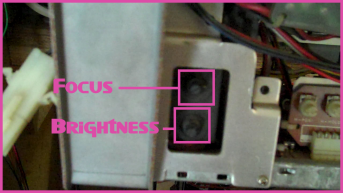
Some monitors have three knobs on the flyback. If this is the case with your monitor, try turning the knobs just slightly to identify which knob does what.
While there is a brightness on the flyback, there is typically a brightness adjustment on the control board as well. The control board usually contains adjustments for horizontal and vertical hold, brightness and contrast among other things. Control boards can come in a variety of ways. Sometimes they are a separate board attached directly to the chassis or by a group of wires. Other times there are just pots, or potentiometers, soldered directly to the chassis. Please see the diagram below.

If you are having scrolling screen or sync issues, you might try to adjust the horizontal and vertical hold. Everything else on the control board is pretty self explanatory. The contrast is very important if this monitor is located in a light gun game. Light guns depend on a bright monitor to work so make sure that this is adjusted correctly.
Next, let’s take a look at the color adjustments. Color adjustments are usually located on the neck board. The neck board is a small board attached to the back of the tube. Look for some adjustments located either on the top or the edges of this board. These are the color adjustments. Please see the diagram below.

There are typically two adjustments for each color: a drive and a cutoff. The drive affects objects on your screen that are the color of the knob you are adjusting. For instance, if the life bars on your Street Fighter II arcade game are not red enough for your liking, you would want to adjust the red drive. You can think of the cutoff more like the “tint” on your monitor. If there are no red objects on your screen but you see sort of a reddish tint on your monitor then you need to adjust your red cutoff.
One thing to keep in mind is that many games have monitor test screens in their test mode that allow you to easily see adjustments that need to be made. Check your arcade game manual for more information. We also recommend marking your pot and your board with a magic or permanent marker once you have found the adjustments to be to your liking. Some people like to put super glue or silicon on these knobs at this point. We discourage this practice because monitor tubes can change over time and, as such, these adjustments can change. Adding super glue or silicon to your knobs will make an adjustment that should take just a second or two take ten minutes or more.
Taking time to adjust your arcade monitor before doing a cap kit can save you time and money. Make sure you adjust your monitor on a regular basis so you can continue to enjoy your arcade game in the future. If you have any other comments, questions or suggestions about adjusting arcade monitors feel free to leave a message below in our comments section.


We recently purchased a classic arkanoid 2 game and had it shipped from NJ to WI and are having troubles getting the monitor to display correctly. We have adjusted the controls that you describe above, but what we are seeing are 4 images repeated rather than just the one. Any ideas?
Anne Weiland,
This problem does not really sound like a monitor issue. We would suggest starting at the PCB or Board and checking the connector that attaches to it as this could have come loose in transit. You can also try removing the connector all together and taking a pencil eraser to the board in this spot. This is a well known solution for cleaning an edge connector on a PCB. Please let us know if you try these things and you continue to have problems.
We have also featured your question on episode 1 of our Q&A podcast. Look for it to be posted on our website soon. Thank you for your question and keep us posted on your issue.
We have an old original Ms. Pac Man. The monitor is discolored down the middle. We have adjusted the colors as suggested in your video. Someone told us we need to find a hand held defussing coil to run over the top of the screen. Does this sound familiar / right? If so, where can we get one.
Kari,
While it would be good for you to get a degaussing coil, it doesn’t sound like it would solve this particular problem. This problem sounds more like a bad cap somewhere on the monitor chassis. Please check out our post on Installing A Cap Kit for more information. If you need some help identifying your monitor, please send some pictures to us at questions@arcaderepairtips.com and we’ll help you out.
We have also featured your question on episode 4 of our Q&A podcast. Please listen to it for more of our thoughts on your issue. Thank you for your question and good luck with your repair.
We bought big buck hunter that was shipped and the only issue with the monitor is that it’s not displaying the “red” color at all. During the tests, all the other major colors displayed okay, but when the red test came up, it wasn’t red. Is this a major or minor fix?
Thanks!
hi
i have problem because i see arcade monitor ghost image,i mean
is not clear.How i can resolve this?
Thanks a lot
Nick,
This issue is probably being caused by a short in the wiring between your board and your monitor chassis. Overall we would consider this a minor repair. Check the red video output wire going from the board to the monitor. You can located it by using a JAMMA pinout diagram such as the one located here. You might try wiggling this wire it to see if the red comes in or goes out or you can check the continuity using a multimeter. If you do not find a short in this wiring then your problem will be located in your monitor at which point it will be better to send off for repair.
We have also featured your question on episode 6 of our Q&A podcast. Please listen to it for more of our thoughts on your question. Thank you for your question and let us know if this solves your issue.
Miguel,
This problem could be caused by setting your colors or your contrast too high. We would recommend turning down the contrast and your colors to see if this makes a difference in your picture. Please see our post on Adjusting An Arcade Monitor for more information. Also, we would really like to see some pictures of the ghosting problem that you are describing. Please send some to questions@arcaderepairtips.com so we can help your further with your repair.
We have also featured your question on episode 6 of our Q&A podcast. Please listen to it for more of our thoughts on your question. Thank you for your question and stay tuned for more videos and podcasts.
My monitor is taking about 5 minutes to warm up. You can not see anything for about 2 minutes and then after 5-10 minutes the monitor looks great. It progressively gets better. Any ideas?
Jeff C,
While your issue could be related to the tube, this sounds more like the capacitors on your chassis are taking a while to warm up. We would recommend installing a cap kit on your monitor chassis. Please see our post on Installing A Cap Kit for more information. If you continue to have problems after then you might want to look into rejuvenating your tube or a new tube all together.
We have also featured your question on episode 7 of our Q&A podcast. Please listen to it for more of our thoughts on your question. Thank you for your question and please keep us updated on your status with this issue.
I have a street fighter 2 machine monitor that’s giving me problems. It was fine before I hooked up a different board to it for SF2-Turbo, and now both boards have a messed up monitor.
It jumps between being very washed out and high contrasty to looking almost like a photo negative. All the colors reverse practically and you can’t see fireballs.
Usually a twack on the machine or machine movement will get it to just back and forth. Neither is really acceptable, since it was working fine before.
Any suggestions?
Hi there, I have a Neo Geo 1 slot arcade cabinet that’s working just fine except for the fact I can’t seem to find the potentiometer to adjust horizontal size. There’s actually a portable “extension” unit that’s wired up to the board at the back so you can stand in front of the machine and tweak the monitor’s settings. The row of knobs on the back from left to right are as follows:
HPOS / HHOLD / VPOS / VSIZE / VHOLD / BRIGHT / CONT
So everything there (except for HHOLD which is only adjustable from the back) is wired to the extension board. There’s also a small different looking turn-able knob off to the upper-left of this row that says 50-60hz. Turning that just makes the image squash into itself from the bottom.
I’ve searched every inch of hardware at the back of the monitor for something to adjust the HSIZE but I can’t find anything. As it stands right now I’m missing a significant chunk of space on either side of the screen. I can scroll the image back and forth with HPOS to see what I’m missing but there’s no way to adjust it so the whole image fits in the viewable area.
Have any ideas? Thanks!
Robin,
Switching the boards in your cabinet should not have caused this issue. Sounds like you might have some wiring issues. You could try hooking another JAMMA board into the game to see if the monitor gets the same results. We would also recommend checking out our post on Adjusting An Arcade Monitor to see if you can adjust out the problems you are having. Also, check out our post on Checking And Replacing A Power Supply to see if you are getting the correct voltage.
If what we talked about above doesn’t work, then you really need to start looking at your monitor chassis. Inspect your chassis and check for cold solder joints and bad capacitors. We would particularly recommend checking the wires coming from your board to the monitor chassis.
We have also featured your question on episode 9 of our Q&A podcast. Please listen to it for more of our thoughts on your question. Thank you for your question and keep us posted on your progress.
Hi guys,
I just picked up a Mortal Kombat cabinet with a 25″ Hantarex MTC9000 monitor. The monitor works, but the sides of the image sort of bow in like an hourglass. It’s most noticeable on screens with straight lines on either side.
I’ve played around with some of the knobs to no avail – Horizontal Amp and Horizontal Phase don’t seem to quite do what I need.
Any ideas? If you’ve already covered this in a podcast please point me in the right direction. 🙂
-Dan
Devin,
We have just recently put up a post and video on this topic. Please see our post on Adjusting The Horizontal Width Coil for more information. We also talk about other methods for adjusting your horizontal size in case you do not have luck adjusting the coil.
We have also featured your question on episode 10 of our Q&A podcast. Please listen to it for more of our thoughts on your question. Thank you for your question and keep us updated on your repair.
Dan,
The hourglass shape that you are getting on your tube is probably related to some bad capacitors in your horizontal or vertical area. We often refer to this screen shape as the hula effect. We recommend taking your chassis out and visually inspecting it to see if you can identify any bad capacitors. Of course, you can also test these capacitors with an ESR meter if you want to be sure. If you feel confident that the caps are good then you might want to take a look at the potentiometers on your chassis as well as the horizontal width coil to make sure they are working properly.
We have also featured your question on episode 11 of our Q&A podcast. Please listen to it for more of our thoughts on your question. Thank you for your question and good luck with your repair.
I recently picked up a “Double Dragon” arcade machine. The game plays fine, but the entire screen is bathed in red. Any suggestions?
Hi, i have a Ikari Warriors SNK non jamma machine. When I turn it on, it slowly goes bright white, and there are some poping sounds from the monitor, flashes of blue and purple happen around the edges, also sometimes there is a green line all the way on the left.
This monitor did show the ikari warriors startup screen before i moved it.
Hey,
I recently got a mini ‘bartop’ cab from an arcade rental store in South Korea. I know pretty much nothing about repairing/maintaing an arcade and so your site was such a help with my monitor issue. I assumed it was just an old crummy monitor but after watching your video and making some adjustments it’s looking great. Brilliant video guys. You’ve made a new fan of your site with one video. Keep up the good work.
Jerry,
The “bathed in red” you are describing could be a couple of things. The first one we would check is to make sure our red drive is adjusted properly. If it doesn’t look like the problem gets any better when adjusting the red drive it could be that your potentiometer is either damaged or bad. I would only assume the potentiometer is bad if I had already checked the wiring going from the board to the monitor. It could be that the green and blue are not making a good connection causing you to see just the red. Make sure these wires are making a good connection and that the pins do not have cold solder joints to the board before replacing a potentiometer.
Should you try both of these and you still do not get the desired result then we would recommend installing a cap kit on the chassis. Please see our post on Installing A Cap Kit for more information.
We have also featured your question on episode 12 of our Q&A podcast. Please listen to it for more of our thoughts on your question. Thank you for your question and good luck with your repair.
I have a BloodStorm arcade cab. I have the problem with the color, and the colors are off. For example, the black background will be red, black objects are red-black, etc. I’ve taken out the monitor chasis, and I have cleaned everything. For a while, the colors were correct. But, after a hour, the bad colors returned.
Can you help?
I would like to add, adjusting the colors on the monitor have no effect.
I just picked up a 1 slot neo geo in a dynamo cab. When I get it home and plug it in the colors are all messed up. It looks like it was around some huge speakers. The left side of the screen is really red, the center is normal and the right side is really green. I have tried adjusting all the pots and no luck. Should I try to degauss?
Thanks!
Reno,
Definitely sounds like you are having some problems with your monitor. Obviously you need to take safety precautions when working with this one as the popping is usually a sign of some high voltage issues. The popping symptom usually leads us to a flyback or HOT issue on your chassis. You need to test these parts on your chassis and replace them (if necessary) to see if it clears up the issue. Check out our videos on Troubleshooting Monitors With Michael and More Troubleshooting Monitors With Michael for some good tips on working with monitors.
We have also featured your question on episode 13 of our Q&A podcast. Please listen to it for more of our thoughts on your question. Thank you for your question and good luck with your future repairs.
Brandon,
Anytime you’re getting some color issues you probably need to think about installing a cap kit. Please see our post on Installing A Cap Kit for more information. It could be that your red cutoff and drive pots or the transistors driving the pots are bad. This could be especially true if adjusting these pots has no effect on your picture. You might try to make these adjustments again to see if they make even a little difference. If not, then you probably need to try refreshing the solder around them. If refreshing the solder does not help then it’s probably time to replace them.
We have also featured your question on episode 13 of our Q&A podcast. Please listen to it for more of our thoughts on your question. Thank you for your question and good luck with your future repairs.
Hi Guys,
I recently aquired an almost mint Defender. For a month the screen was excellent but I never left it on for over an hour, I would always turn it off when it wasn’t in use. Recently I left it on for a few days strait and I came home to find the monitor was black but the rest of the machine was running fine. When I turn it on I get a flash of white then it goes black, when I turn it off I get a circle of rainbow colors for about half a second. Any idea what is wrong here? Thank you in advance.
Hey Guys,
Recently I purchased an almost mint Defender. For a month the monitor worked fine but I only left it on while it was in use and turned it off when it wasn’t. A few days ago I decided to leave it on for a while just to make sure there were no over heating issues. Now, the machine turns on fine and works properly all except there is no display at all. When I turn it on the monitor flashes white then goes black, when I turn it off I get a circle of rainbow colors for a split second. The tube does have a glow to it and the caps ‘look’ fine. Any idea what this could be? Thank you in advance.
Hi there.
My friends and I recently purchased a dedicated Lethal Enforcers. We probably should have done some research before moving the unit, but because of it’s weight, we had to take out the monitor to make it lighter. We didn’t unhook/unscrew anything on the actual monitor or chassis, just the bolts that held it onto the cabinet. When we put it all together and started it up, there was a massive amount of distortion and wavy lines. Upon messing with the vert/horz hold and positioning, we were able to someone rectify the problem, but we can’t get it to even a reasonable viewing spot. The knobs are hyper sensitive and barely touching one of them will send the screen into chaos. Have you run into anything like this? We are total novices to arcades and may have to call someone for help.
Thanks!
Tom,
You definitely want to try and degauss first. If that doesn’t work then it could be that your convergence rings are out of alignment. These rings are located on the back of the neck of your monitor usually right above the glass, glowing part. The rings control the alignment of the color guns (RGB). It could be that one of these guns is not aligned properly causing your discoloration.
A word of warning before modifying these rings, make sure you use a paint pen or white out to draw a line across them (on a flat, even area going past the edge of the rings on to the tube) before trying the move them. If you get these out of alignment they are notoriously hard to get back into alignment without marking them first. Please make sure that you take this step with the monitor off.
Once you’ve marked them, you can turn your monitor back on and start adjusting them. Make sure you take all of the proper safety precautions when working with a live monitor. Rubber gloves are a plus! Adjust each one to see if it makes any difference at all and if not just move them all back to their original positions.
We have also featured your question on episode 14 of our podcast. Please listen to it for more of our thoughts on your issue. Thank you for your question and keep us updated on your progress.
Kirk,
This sounds like it’s a problem with either the connection between your board and your monitor or your monitor chassis. If you are getting game sounds but no picture (a symptom we call “playing blind”) then you’ve probably got a problem with your monitor chassis. This really sounds like you need to replace the HOT (or Horizontal Output Transistor) on your monitor chassis. Please see our posts on Troubleshooting Monitors With Michael and More Troubleshooting Monitors With Michael for more information. Also, check out our online store where we have our Volume 2 DVD on sale which has a video on replacing the HOT.
We have also featured your question on episode 14 of our podcast. Please listen to it for more of our thoughts on your issue. Thank you for your question and keep us updated on your progress.
Hello, I have been working on An EME Ghost & Goblins for a couple of weeks now, & had to replace a couple of power transistors on each end of the Eastern Micro Electronics video board. The problem is this, I now have five identical images on the screen instead of one, & they’re not very clear. I’m sure adjustments will take care of the clarity. Color is good, though. Do you have any ideas as to what the problem might be???
Hey guys,
I just purchased a Centipede arcade game. I have several horizontal lines running thru the screen. There lines are stable thru the screen. You could still play the game but the annoying red lines are thru the screen. I’m not really sure where to start as far as troubleshooting. This is my first project and could use some advice. Let me know what you think.
Thanks
JJ,
It really sounds like there are some wiring issues going on here. I would particularly look around the wiring coming from the board to the monitor. Sounds like the sync wire or the pin that it connects to on the chassis might be having some problems. Check your sync wire and touch up some of the solder on the back of the pin where it connects to on the chassis and see if it makes a difference. If you don’t know which wire is sync, check out our JAMMA wiring diagram and trace it from where the board connects to the monitor. You might also double check that you have the connector plugged in correctly to the monitor.
We have also featured your question on episode 15 of our Q&A podcast. Please listen to it for more of our thoughts on your question. Thank you for your question and keep us updated on your progress.
Ferdie,
What you are describing sounds less like a monitor issue and more like a board issue. You might check the voltage going to the board and see if the board gives you any error messages on boot up. Of course, since you have been working on the monitor it could still be the problem. We would definitely like to see a picture of your monitor. If you get a chance you might send us one over so we can help you troubleshoot this issue further.
We have also featured your question on episode 15 of our Q&A podcast. Please listen to it for more of our thoughts on your question. Thank you for your question and keep us updated on your progress.
Tony,
The lines running through the screen as you are describing are often called jail bars. You could try to adjust some of the color pots on your monitor to see if it makes a difference but more than likely you’ll probably need to install a cap kit on your monitor chassis. Please see our posts on Adjusting An Arcade Monitor and Installing A Cap Kit for more information.
We have also featured your question on episode 15 of our Q&A podcast. Please listen to it for more of our thoughts on your question. Thank you for your question and keep us updated on your progress.
I WAS WONDERING ON MY GAME(TOOBIN’), I’VE BEEN LOSING MY PICTURE AND THEN IT WAS GONE WHEN I TURNED IT BACK ON. ABOUT A WEEK WENT BY AND I TURNED IT ON AGAIN THE PICTURE CAME ON BLURRY FOR ABOUT 15 SECONDS AND THEN I GOT A BRIGHT WHITE LINE ACROSS THE CENTER. WHAT DO YOU THINK ? FLYBACK OR SOMETHING ELSE?
Brian,
Flyback sounds like a very reasonable conclusion. We would definitely start by replacing that first before troubleshooting any other issues. It’s very possible that you’re having multiple problems with this one but start off by replacing the flyback before trying to solve the rest. If you need help replacing a flyback, there is a video on our Volume 2 DVD entitled Checking And Replacing The Flyback. You can order this DVD from our online store.
We have also featured your question on episode 16 of our Q&A podcast. Please listen to it for more of our thoughts on your question. Thank you for your question and good luck with this repair.
hi My arcade was working great. Now I get sound & can hear play but the monitor is completely black. Will a cap kit solve this issue? Thank You in advance
My monitor has a line straigbt down the middle and makes a humming sound and the picture doesn’t show. What can I do? Any ideas?
See my question has been deleted. If you have already answered would like to know where to find the answer. My Neo Geo worked fine then one day screen was black, game sounds great but no picture. i also have a gorf that shows blue screen with no game sound. Any advice would greatly help
Brad,
First off, I wanted to write you and let you know that we saw both your initial and follow up comments on our website. We did not delete or ignore either of them. We get a lot of questions on a regular basis and it’s hard for us to reply to all of them in a timely fashion. We usually tell people that our lead time on questions is 4-6 weeks. Sorry for the slow response.
As for your question, a cap kit might solve your issue but it sounds more like a problem with your chassis getting power. Try the steps listed below (in order from top to bottom) to help you figure out what’s causing your issue:
* Start off by using a multimeter to make sure you have power going to your monitor chassis. If there is no power getting to your chassis then you will need to trace down where the monitor power comes from (probably an isolation transformer) and make sure you have good power there.
* If you’ve determined that you have power getting to your chassis, try checking the fuse on the monitor chassis to see if it is blown. Check out our post on Checking Fuses With A Multimeter for more information.
* If your fuse is OK, you can check your flyback and HOT to see if they are good. We have videos on checking these parts on our Volume 2 DVD if you need help with that. Visit our online store to purchase this DVD.
* You can also try checking the caps in the power supply section of your chassis. This section is usually located around where the power cord connects to the chassis. Leaking or curved tops on the capacitors are a good indication that they are bad.
Hopefully you’ll find a problem area that you can repair when you are checking these areas. As for your Gorf, sounds like it’s having some board problems. Start off by checking your power supply to make sure good power is coming in. If you are still having problems, you might take the board out of the game and look for broken solder joints to touch up with your soldering iron. This is a pretty common cause for board failure.
I also wanted to tell you that I’ve added your comments to our outline for episode 20 of our podcast. It will hopefully be up next week sometime. You can listen to it for more thoughts on your issues. Thank you for your questions and good luck with your repairs.
Richard,
Without knowing any other details, it sounds like you’re having some monitor collapse along with some board issues. Check the vertical IC (Integrated Circuit) chip to see if it is good and if it is getting power. You can check it with a standard multimeter. You can try refreshing the solder around the chip but if that doesn’t work we recommend just replacing the chip altogether. Check out our posts on Troubleshooting Monitors With Michael and More Troubleshooting Monitors With Michael for more information. The humming sound you are describing might be attributed to a broken speaker, the volume being up too high on your board or a bad board altogether. We would recommend checking the power going to your board to see if it is getting the correct voltage. See our post on Checking And Replacing A Power Supply for more information.
We have also featured your question on episode 20 of our Q&A podcast. Please listen to it for more of our thoughts on your question. Thank you for your question and please keep us updated on your repair.
Hello,
I have a Ninja Turtle 4 player Arcade machine and the monitor is playing up, but I know I could fix it with the rings on the back of the machine… But most of the rings have snapped or broken off. What’s the easiest way to replace the rings? I play around with the back but get electric shocked a bit. Thanks for any help you can give. This is the best site for this info on the net.
Shane
Shane,
Unfortunately there’s no good way to replace these rings. Your best options are to either replace the yoke or replace the tube. That being said, it might not be the convergence rings that are causing your problem. As we discuss in our post on Adjusting The Convergence Rings, the main symptoms of bad convergence are color bleeding and/or shadowing. If you are not experiencing these symptoms then you could be having some other monitor issues. Please let us know the brand and model of your monitor and we’ll help you troubleshoot this further.
We have also featured your question on episode 23 of our Q&A podcast. Please listen to it for more of our thoughts on your question. Thank you for your question and good luck with your repair.
Hello,
I just bought a Capcom CPS2 cabinet and for some reason it seems to reset a lot. After a while it stops working completely and then makes a weird bumping noise like it’s trying to reset itself. After a little bit of tinkering with the wires it will come on for a bit but then do the same thing. How can I fix that?
Also at the top of the screen it looks like it’s overlapping itself, you can notice especially in smups. I tried to change the vertical settings and when I make it less vertical you can’t notice as much, but it is really annoying and I was wondering if there was any way to fix that?
Thanks in advance.
Hi i have a Smash TV cab and it has garbage colored lines coming down the screen. Ive tried all the adjustors and nothing. By the way the test screen comes up perfect. When i run the test it says that CPU chip 99 is bad could that be the issue? The game plays behind the colored lines but is unplayable the way it sits. Please tell me how i can fix this.
Never mind my comment on the smash TV cab i popped the chip out with a glasses screw driver and cleaned it. I popped the chip back in and in runs perfect. I also wanna say its a great cab the game is awsome and very challenging. Its great to have it working in my arcade collection.
Charlie,
Resetting issues such as the ones you are describing are usually caused by a power supply issue. It could be that either your power supply needs to be adjusted or that it is faulty. The best thing to do is to check it with a multimeter and the adjust it to see if you can get the +12 VDC and +5 VDC within an acceptable range. Please see our post on Checking And Replacing A Power Supply for more information.
Your second issue is probably related to your monitor chassis. The type of overlapping you are describing on your screen is typically caused by a bad capacitor. Instead of just replacing the one capacitor, it’s probably a good idea to install an entire cap kit on your chassis. Please see our post on Installing A Cap Kit for more information.
We have also featured your questions on episode 24 of our Q&A podcast. Please listen to it for more of our thoughts on your questions. Thank you for your questions and good luck with your repairs.
I had an issue with my Jamma Monitor (Arcade) with some of the colors being washed out, I really thought the worse, I thought OMG I would need to have changed the monitor out or something else that was $$$$ costly. I came onto your web site and simply adjusted the colors, brightness and the game looks brand new as if I purchased a new one, thank you for your awesome tips, hints and videos, this is an amazing web site that truly helps you !
Thank you! Five minutes of my time and now my Gauntlet Legends looks as good as the day it was built!
thanks for all the online help! Your the best!! I use your sites quite often and can’t tell you how much its helped I now have three working arcade games 🙂 but i’m running out of room, any videos on that problem? lol
Thank you so much for posting this. I was about to hire someone to fix my monitor issue. A quick flyback adjustment and I am ready to play!